
Installation of the hardware
Note
During the installation process you must at all times take the provisions of the safety, maintenance and legal notices into account.
Model OM1
Hardware Installation
Wall-mounted
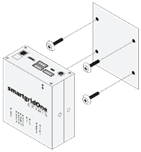
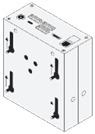
- Accurately measure the hole pattern for the mounting points.
Tip
The MidTeQ PULSE EMS has a hole pattern of 80mm x 63mm (W x H).
The screw head should not exceed a diameter of 7mm (e.g., a universal screw of 4 x 40mm is recommended).
For a flush mount, ensure the screws protrude no more than 8mm from the wall.
- Insert the required screws into the surface where the MidTeQ PULSE EMS will be mounted, ensuring they are securely fastened.
- Carefully align the MidTeQ PULSE EMS with the installed screws and slide it into place. Ensure it is securely mounted.
DIN-rail mount
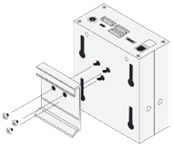
- Attach the DIN-rail mount to the MidTeQ PULSE EMS using the provided screw holes.
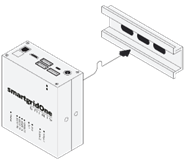
- Carefully attach the MidTeQ PULSE EMS to the DIN-rail. Ensure it is securely mounted.
Note
DIN-rail mounts need to be ordered seperately.
Electrical Installation
Power Supply
The MidTeQ PULSE EMS requires a 12V (2A) DC power supply connected via a 5.5mm jack. The required power adapter is included in the delivery package.
Connecting the interfaces
See the supported device guides and the wiring & connectivity guidelines for the connection of devices.
Network Connection
The MidTeQ PULSE EMS must always be connected to a wired (RJ45) network interface to ensure reliable communication and functionality. See also the wiring & connectivity guidelines.